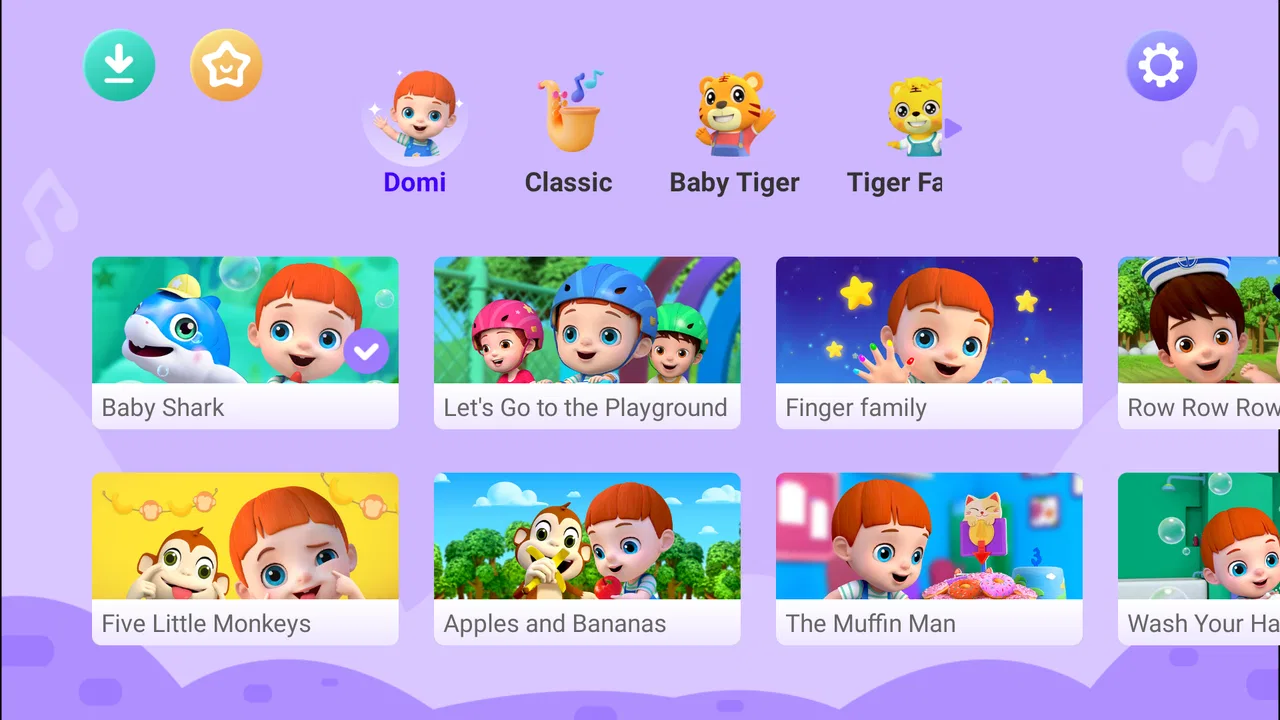
Baby Domi-Kids Music& Rhymes
- 4.6
- Rating
- 500.00K
- Installs
- Free
- Price

 Analysis by App-foxy
When I tried Baby Domi-Kids Music& Rhymes, I found a straightforward parenting app built around cheerful audio and visual entertainment rather than lessons, games, or complicated activities. Its mix of rhymes, cartoons, baby music, and laughter makes the most sense during the small gaps in a family day: while a parent prepares breakfast, during a quiet afternoon reset, or when a child needs a familiar distraction during a short wait.
That simplicity is the main reason I can imagine recommending it to some households. I would not present it as a complete child-development tool or as a replacement for reading, talking, singing together, or active play. Instead, I see it as a compact entertainment option for young children, with an Everyone age rating and a free starting point. The app comes from BabyTiger Kid Apps & Games, and its parenting focus is clear even before spending time with it.
The app has attracted an average rating of 4.6 from around 5.4 thousand ratings and has passed 500 thousand installs. Those figures suggest that it has found a real audience, but they do not remove the need for a parent to decide whether its style suits a particular child. In my experience, the best way to judge it is not by asking whether it can keep a child busy forever, but whether it fits a short, supervised moment without creating more friction than it solves.
You May Also Like

 Blood Strike: 2.5 Anniversary
Blood Strike’s Loadouts Turn Every Drop Into a Tactical Gamble
A close look at Blood Strike’s custom loadouts: how fast access to signature weapons reshapes its battle royale rhythm, rewards preparation, and narrows the gap between fights.

 Pandora - Music & Podcasts
Pandora’s Music Is Easy to Start, but Harder to Recover
Pandora’s strength is its low-effort path from a seed to a station. Its weak spot is how much confidence it asks you to place in connection, setup, and quiet recovery.

 8 Ball Pool
 Is Built on Rivalries, Rematches, and Routine
A close look at the rivalries, rematches, shared routines, and unanswered safety questions that turn a quick pool match into a persistent mobile community.

 Samsung Music
’s Quiet Strength Is Playing What You Already Own
Its reach comes less from spectacle than from dependable access to a personal library. That simplicity is both the app’s strongest retention engine and its ceiling.

 AccuWeather: Weather Radar
AccuWeather Review: A Quick, Clear Forecast for Everyday Decisions
For everyday plans, the best forecast is the one you can understand quickly. AccuWeather makes rain timing, radar, and local conditions easy to act on, with a few trade-offs.

 Hill Climb Racing
Why Hill Climb Racing Still Turns Crashes Into One More Run
A tiny car, a bumpy hill and one more upgrade: Hill Climb Racing keeps resurfacing because its simple chaos makes every near-miss feel personal.
More From Our News Desk



How Baby Domi fits into a shared family device
When I think about Baby Domi on a phone or tablet that adults and children both use, I focus less on the app alone and more on the handoff: who has the device before and after the child’s turn. A simple routine can prevent a cheerful session from spilling into messages, photos, or other adult tasks. That makes it worth deciding what “ready to share” means in your household before opening the app.
A practical role during busy household moments
The most convincing use case is a shared phone or tablet used briefly by more than one person in the home. Imagine one parent needing both hands for ten minutes while another adult is preparing to leave or handling an older child. A collection of familiar rhymes and playful sounds can give a toddler something predictable to watch and hear without requiring the adult to explain rules or guide a complicated game.
I would use it in short windows rather than leave it running as background entertainment. For example, a parent could choose a few songs before starting a household task, keep the device nearby, and then put it away when the task is finished. That approach makes the app part of a routine instead of allowing it to become the default answer to every moment of boredom.
The shared-device angle also changes how I judge the design. An app for a family tablet needs to be easy to hand over, easy to pause, and easy for an adult to understand at a glance. Baby Domi’s appeal is that its subject matter is immediately recognizable: music, rhymes, cartoons, and laughter. A child does not need to understand a points system or a complicated menu before the entertainment becomes useful.
There is a trade-off here. A simple media app may be less demanding than an educational activity, but it may also offer less active participation. If you want your child to practise letters, solve puzzles, draw, or follow a structured learning path, a dedicated educational app will probably be a better choice. I would choose this one when the immediate goal is gentle entertainment, not measurable progress through lessons.
Why the short-session approach works better
One useful habit is to decide the purpose of the session before opening the app. If I need a calm transition before a nap, I would keep the volume comfortable and avoid treating the cartoons as a reward that must continue indefinitely. If I need a little entertainment during a waiting period, I would regard the app as a temporary activity and switch to conversation or a physical toy afterward.
This matters because music and animated content can hold attention very effectively, especially for younger children. The same quality that makes the app convenient can make stopping difficult. I would therefore avoid handing over the device without a clear endpoint, particularly with a child who becomes upset when screen time changes suddenly.
A second practical tip is to check the device before giving it to a child. On a shared phone, notifications, open conversations, photos, or unrelated apps can interrupt the experience and expose content that was never intended for a young viewer. Baby Domi may be child-oriented, but the entire device may not be. A parent-controlled handoff is more important than the app’s cheerful presentation.
What it is like for different children
Children do not respond to rhymes and cartoons in exactly the same way. One child may enjoy repeated songs and animated scenes, while another may lose interest quickly or prefer interactive play. I would give the app a fair trial during a calm moment rather than introducing it for the first time when everyone is already tired or rushed.
For a child who enjoys sound, repetition, and bright visual activity, the format should be easy to approach. For a child who is sensitive to loud audio or fast-changing images, I would begin with the volume low and stay close enough to observe the reaction. The Everyone rating is reassuring as a broad age classification, but it is not a substitute for a parent’s knowledge of a particular child’s sensitivities.
Setting boundaries before the first shared-device session
Before the first session, I would agree on a practical boundary: where the device will be used, who will hold it, and what signals that the turn is over. These choices matter even when the content is intended for children, because a shared screen still belongs to the whole family. Once that groundwork is clear, it becomes easier for parents, siblings, and caregivers to follow the same expectations.
Free access and the question of purchases
Baby Domi is free to download, which makes it easy to test without committing money at the outset. That is useful for families who want to see whether a child responds well to the content before deciding whether the app deserves a regular place on a device.
There are in-app purchases priced from $3.99 to $28.99 per item. For a shared family device, that detail deserves attention before a child starts tapping around. I would inspect the purchase path myself, keep purchasing protected by the device’s normal adult approval process, and avoid assuming that a child-friendly interface is also purchase-proof. The safest workflow is to let the child enjoy the content while an adult handles any decision involving payment.
This is one of the clearest differences between a dedicated collection of offline songs and a free app with optional purchases. A paid music collection may cost more at the beginning but can feel simpler once installed. Baby Domi is more flexible for trying first, yet it requires more awareness around the point where free use may lead toward paid items. That is not automatically a flaw, but it is a real household consideration.
Separating adult decisions from child access
On a shared tablet, I would create a simple handoff routine: an adult opens the app, confirms that the intended child content is ready, and only then gives the device over. Afterward, the adult closes the app rather than leaving the tablet unlocked on the same screen. This small habit helps separate entertainment time from adult tasks such as messages, shopping, or work.
I would also avoid presenting the app as something the child can access whenever they want. That makes it easier to maintain a predictable rhythm and reduces arguments about stopping. A visual timer, a spoken warning, or a clear phrase such as “one more rhyme, then we put the tablet away” can be more useful than relying on the child to decide when the session has finished.
Families sharing one device should remember that the app’s age suitability does not settle every privacy or account question for the household. The device may contain several adult accounts, saved payment methods, or personal media. Baby Domi can be part of a child-friendly routine, but it should not be treated as a complete boundary between a child and everything else on the tablet.
Handling interruptions and transitions
A realistic problem with any media app is that the child may be interrupted before they feel finished. A phone call, a meal, a sibling needing help, or a change in the family schedule can end the session unexpectedly. I found it more practical to introduce the app during moments where a parent can spare a minute for transition, rather than starting it immediately before an unavoidable appointment.
For smoother handoffs, I would use the same closing routine each time. Pause the content, explain what happens next, and move the device out of reach before offering another activity. This is not a special feature of Baby Domi; it is a way to make a simple entertainment app work better in a real household. The app supplies the content, while the adult supplies the structure.
Coordinating use between parents, siblings, and caregivers
A shared app can become a source of disagreement if each adult sets different limits or siblings assume they can take turns whenever they like. I find it helpful to name one adult as the person who starts and ends a session, while making the next activity clear to everyone. That small bit of coordination keeps the app in its intended role as a brief activity rather than a family-wide negotiation.
Keeping expectations consistent
In a home with several caregivers, the biggest source of friction is often not the app itself but different assumptions about how it should be used. One adult may allow a quick rhyme while another expects the device to stay away during meals. I would agree on a few basic rules before making Baby Domi part of the routine: when it can be used, who starts it, and what signals the end.
That coordination is especially helpful when grandparents, babysitters, or older siblings take turns supervising. The app is easy to describe because its purpose is narrow, but the surrounding expectations still need to be clear. A caregiver should know whether the child may browse independently, whether purchases are off limits, and whether the device is being shared with adults afterward.
I would not assume that every family member will use the same approach automatically. A short spoken agreement can prevent a child from hearing different answers from different adults. It also prevents Baby Domi from becoming a bargaining tool between siblings or a source of disagreement about who gets the tablet next.
Managing siblings and mixed ages
The app is aimed at young children, so it may work best when the intended child is the clear viewer. An older sibling might tolerate the rhymes for a while, but may quickly want a game, video, or creative activity with more control. If two children share the screen, I would check that both are genuinely enjoying the content rather than allowing one child to dominate the device while the other waits.
A useful arrangement is to give the younger child a short Baby Domi session while the older child has a separate activity nearby. That avoids pretending that one app must satisfy every age in the household. If the children want to watch together, I would make the session collaborative by encouraging the older child to sing along or help with the handoff, rather than turning the older child into an unsupervised controller.
This is also where the app compares differently with interactive learning platforms. A structured game may offer separate profiles or progress paths in some cases, while a simple music-and-rhyme app is more naturally shared in the moment. Baby Domi is better suited to a common, low-pressure activity than to tracking individual achievement across siblings.
A workflow for a busy morning
Consider a weekday morning when one parent is packing a bag, another is preparing food, and a toddler is becoming impatient. I would prepare the tablet first, open the app, check the volume, and choose a place where the child can see the screen without carrying the device around. The adult would then explain that the app is for the short preparation period, not for the entire morning.
When the task is nearly complete, I would give a warning before stopping and have the next activity ready: breakfast, getting dressed, or a toy placed nearby. This makes the transition concrete. If the child becomes upset, I would not negotiate by immediately extending the session, because that teaches the opposite boundary from the one the family intended.
That scenario shows the app’s real strength. It can fill a narrow gap without demanding much preparation from the child. It also shows its limitation: it does not organize the household routine for you. Parents still need to choose the time, manage the device, and handle the ending.
Age, trust, and the limits of a child-friendly label
An Everyone rating is a useful starting point, but I would treat it as a broad content guide, not a personal recommendation for every child or situation. Children differ in how they respond to music, animation, and screen transitions, so an adult’s observation still matters. With that distinction in mind, it is easier to decide whether Baby Domi suits a particular child and when another kind of activity would be a better fit.
What the Everyone rating means in practice
The Everyone content rating makes Baby Domi approachable for a broad family audience, particularly when the goal is songs, rhymes, cartoons, and playful sounds for younger viewers. I would still stay nearby during early sessions. Age labels are useful for filtering obvious mismatches, but they cannot tell me whether my own child finds the pace calming, exciting, repetitive, or overwhelming.
Trust also depends on the context in which the app is used. A parent sitting beside a child and singing along is a very different experience from leaving a child alone with a device for a long period. I prefer the first approach. It turns passive viewing into a shared moment and gives the adult a chance to notice when the child has had enough.
For babies and very young toddlers, I would be especially cautious about treating the app as a substitute for face-to-face interaction. Music can support a routine, but it does not replace a caregiver’s voice, eye contact, movement, or response to the child. Baby Domi works best as one small part of the environment, not as the environment itself.
Who should choose another kind of app
I would look elsewhere if my main goal were phonics practice, number recognition, drawing, storytelling with branching choices, or detailed developmental tracking. Baby Domi’s value is entertainment through familiar children’s formats, so a learning app with guided activities would be more appropriate for a parent seeking a clear educational sequence.
I would also skip it if my child strongly dislikes screen-based music or becomes distressed when a session ends. In that case, physical instruments, books, audio played without a screen, or parent-led singing may fit the household better. The free download makes experimentation easy, but no low-cost app is worth adding if it regularly creates conflict.
Families looking for a completely hands-off solution should also reconsider. The app may occupy a child for a while, but responsible use still involves adult supervision, device preparation, purchase awareness, and a plan for stopping. Those responsibilities are not unique to Baby Domi, yet they are particularly important when a shared device contains adult information.
Version and device fit
The current version is 1.2.1, and the app supports devices running Android 5.0 or later. That gives it a broad technical reach for families using an older Android phone or tablet rather than a recent premium device. I would still test it on the exact shared device before building a routine around it, especially if that device is slow, has limited storage, or is already used by several people.
Testing first is useful for more than performance. It lets an adult learn where the child content begins, understand how to return to the main screen, check the audio level, and see how the purchase flow is presented. A five-minute adult inspection can prevent a child from being handed a device that is not ready for independent tapping.
My household verdict after weighing convenience against control
Baby Domi-Kids Music& Rhymes is a sensible option for parents who want free access to child-oriented musical and cartoon entertainment in short, supervised sessions. I like its narrow purpose because it is easy to explain and easy to fit into a busy day. The content style should appeal most to young children who enjoy repetition, songs, playful sounds, and animated viewing.
Its strongest household advantage is convenience without the complexity of a learning platform. I can imagine using it during a brief preparation task, a waiting period, or a transition when a child needs something familiar. Its main weakness is that the same simplicity can encourage passive screen time, while optional purchases mean adults should establish device boundaries before handing over a shared phone or tablet.
The developer, BabyTiger Kid Apps & Games, has positioned this as a parenting app rather than a broad all-purpose media service. That distinction matters. I would recommend it to a parent who wants a small entertainment tool and is comfortable staying involved in when and how it is used. I would not recommend it as the only activity available, a replacement for interaction, or a solution for every age in a multi-child household.
For me, the decision comes down to expectations. If you want a cheerful collection of rhymes, music, cartoons, and laughter that can occupy a young child for a controlled slice of the day, the free starting point makes it worth trying. If you need strong educational structure, independent child profiles, or a fully managed household experience, another category of app will serve you better.
My final recommendation is to use Baby Domi as a planned shared-device activity, not an always-available babysitter. Open it with a purpose, keep an adult in charge of the device and purchases, coordinate the rules with other caregivers, and prepare the next activity before the music stops. Used that way, it can be a pleasant little helper in family life without taking over the routine.
FAQs for Baby Domi-Kids Music& Rhymes
01What is Baby Domi-Kids Music & Rhymes?
Baby Domi-Kids Music & Rhymes is an engaging mobile application designed for young children to enjoy music and rhymes. It offers a collection of interactive songs, colorful animations, and educational content aimed at fostering early learning and entertainment. The app is available for both Android and iOS devices.
02Is Baby Domi-Kids Music & Rhymes safe for my child to use?
Yes, Baby Domi-Kids Music & Rhymes is designed with child safety in mind. It features age-appropriate content and adheres to privacy standards. The app does not include in-app purchases or ads, ensuring a distraction-free and safe environment for your child to explore and learn.
03What age group is Baby Domi-Kids Music & Rhymes suitable for?
The app is ideal for children aged 2 to 6 years old. It offers a range of songs and rhymes that cater to early childhood development, helping young children to learn through music and interactive play. The intuitive design makes it easy for young users to navigate independently.
04Can Baby Domi-Kids Music & Rhymes be used offline?
Yes, Baby Domi-Kids Music & Rhymes offers offline access to its content. Once the app and its files are downloaded, most of the features can be accessed without an internet connection, making it convenient for travel or situations where Wi-Fi may not be available.
05How can I download Baby Domi-Kids Music & Rhymes?
You can download Baby Domi-Kids Music & Rhymes from the Google Play Store for Android devices or the Apple App Store for iOS devices. Simply search for the app name and follow the installation instructions provided by the store. Ensure your device meets the app’s compatibility requirements.
Pros
- Engaging animations for kids.
- Wide variety of songs and rhymes.
- User-friendly interface for toddlers.
- Offline mode available.
- No ads in premium version.
Cons
- Limited songs in free version.
- Requires internet for updates.
- Some features need subscription.
- Not available in all languages.
- Occasional app crashes reported.

Baby Domi-Kids Music& Rhymes
Gallery